
Elite Cloud Storage Boxes
Enterprise-grade redundant server storage space matching your raw backup requirements perfectly. Seamless integration with FTP, SFTP, Samba/CIFS, BorgBackup, and WebDAV.
What is a Storage Box?
A highly reliable disk drive mounted directly in the cloud, giving you ultimate flexibility for server backups or local syncs.
Massive Space
Up to 20 TB of RAID-protected hardware storage capacity for your heaviest directory backups.
Secure & Private
Full secure encryption capabilities, up to 30 isolated sub-accounts.
Flexible Integration
Map your storage as a local drive or connect easily with popular command-line backup protocols.
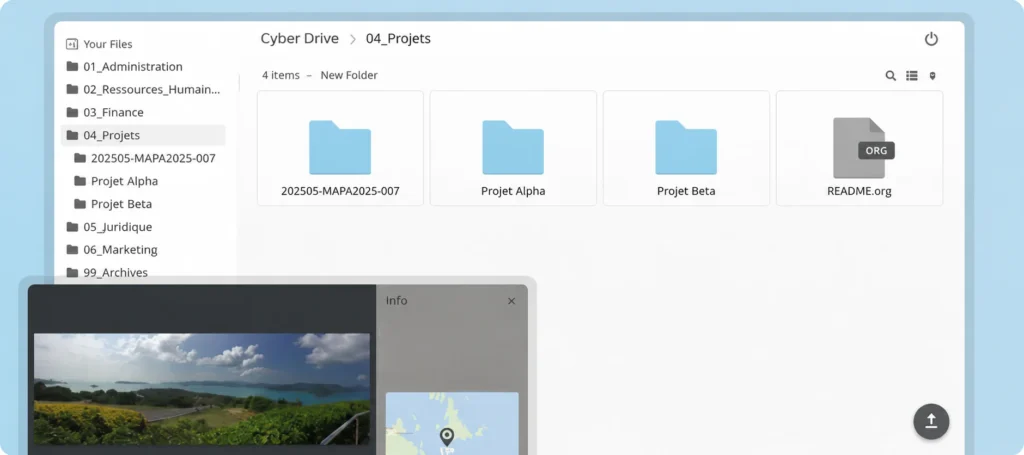
Manage Everything from Your Browser with our Built-in Web File Manager
No extra software installation needed. The Cyber Drive Web File Manager puts full command of your remote files right inside any web browser, completely integrated into your account dashboard.
- Drag & Drop Uploads: Instantly drag directories or individual files from your desktop straight into the browser interface.
- Quick Share Links: Generate secure, customizable download links to quickly share heavy database dumps or directories with clients.
- Built-in Previews: View stored images, documents, or edit config files instantly inside the web application workspace.
Choose Your Perfect Storage Package
Transparent pricing with zero hidden speed caps or data limits. Month-to-month contracts.
Cyber Drive 10TB
R929 Per Month
- 10 TB Secure Storage
- Unlimited Bandwidth
- 10 Sub-accounts
Cyber Drive 20TB
R1699 Per Month
- 20 TB Secure Storage
- Unlimited Bandwidth
- 30 Sub-accounts
Detailed Technical Specifications
| FEATURES | CYBER DRIVE BT1 | CYBER DRIVE BT5 | CYBER DRIVE BT10 | CYBER DRIVE BT20 |
|---|---|---|---|---|
| Available Storage | 1 TB | 5 TB | 10 TB | 20 TB |
| Upgrade/Downgrade | ✓ | ✓ | ✓ | ✓ |
| Traffic | Unlimited | |||
| Free Internal Traffic | ✓ | ✓ | ✓ | ✓ |
| Concurrent Connections | 10 | 10 | 10 | 10 |
| Sub-Accounts | 3 | 5 | 10 | 30 |
| SUPPORTED PROTOCOLS & INTEGRATIONS | ||||
| Built-in Web File Manager (Direct Browser Access) | ✓ | ✓ | ✓ | ✓ |
| FTP / FTPS / SFTP / SCP | ✓ | ✓ | ✓ | ✓ |
| Samba / CIFS (Windows/macOS Network Drive) | ✓ | ✓ | ✓ | ✓ |
| BorgBackup / Restic / Rclone / Rsync via SSH | ✓ | ✓ | ✓ | ✓ |
| HTTPS / WebDAV | ✓ | ✓ | ✓ | ✓ |
Smarter Protocols & Integrations
Configure your Cyber Drive precisely your way. Connect using standard utilities and direct API paths.
Built-in File Manager
Fully secure document explorer on your web dashboard. Drag, drop, preview, and share securely from any browser.
Samba / CIFS Mounts
Mount your storage directly onto Windows, macOS, or Linux, letting you work with files as local directories.
Secure FTP (SFTP & SCP)
Fully secure data transfer, ideal for manual client uploads or simple automated server backup scripts.
Rsync & BorgBackup
Optimize your automation procedures using powerful, light, and secure Linux command line utilities.
Frequently Asked Questions
How does the Cyber Drive Web File Manager work?
Unlike basic FTP storage, Cyber Drive includes a browser-based, interactive file panel. You can drag and drop directories straight from your computer into your browser, generate download links for customers, preview documents, and manage directories instantly.
Can I map the Cyber Drive as a standard computer drive?
Absolutely! Using Samba (SMB/CIFS) or WebDAV protocols, you can easily map your Cyber Drive as a local network drive on both Windows and macOS systems for quick drag-and-drop usage.
Are my uploads subject to bandwidth caps?
No. We do not throttle your bandwidth. You get completely unlimited upload and download storage traffic to move databases, media, or heavy logs without limits.
Can I split my storage up for different team members?
Yes, our Cyber Drives let you easily create isolated sub-accounts (ranging from 3 to 30 depending on your package). This allows you to restrict folders or partition specific segments of your overall space for different users or automated scripts.